Bimodal Affordances: Designing for Humans and Agents Simultaneously
How to design interfaces that serve both human understanding and agent consumption. The two-minds problem, layered information architecture, and why every surface now needs two readers. When Don Norman wrote about affordances in 1988, he was solving a problem with one audience: humans. A door handle affords pulling. A flat plate affords pushing. The signifier makes the affordance visible: the shape of the handle tells you what to do without a manual. Norman's framework assumed a single perceiver. What happens when your system has two? In hybrid human-AI systems, every interface element, every data structure, every workflow state is perceived by two fundamentally different kinds of minds. A human reads visual hierarchy, whitespace, color, and natural language. An agent reads structured data, schemas, confidence metadata, and state machine transitions. Both are trying to answer the same question: "what's happening here and what should I do?": but they perceive the world through entirely different sensory channels. This is the bimodal affordance problem. And we don't have established design patterns for it yet. To design for agents, you have to understand how they "see" the world. This isn't metaphorical: it's a concrete design question with concrete answers. Structured text and schemas. An agent doesn't "see" a webpage the way a human does. It reads the DOM, the ARIA labels, the semantic HTML structure. A well-structured page is legible to both humans and agents. A page that relies on visual layout without semantic markup is beautiful to humans and opaque to agents. Tool descriptions and API schemas. When an agent has access to tools, the tool's name, description, parameter schema, and return type are its affordances. A tool called Declarative files. In agentic systems like OpenClaw, Claude Code, or Cursor, files like State and context. The contents of the agent's context window, its memory files, the conversation history: these are the agent's situational awareness. Unlike humans, agents don't have peripheral vision. They can't glance around a room and absorb ambient context. They see exactly what's in their context, nothing more and nothing less. Confidence and uncertainty metadata. When another system or agent provides a confidence score, a provenance chain, or an uncertainty estimate, that's a signifier designed for agent consumption. Humans can interpret confidence scores, but they're fundamentally an agent-to-agent communication channel. Every design decision in a hybrid system has two questions: Is this legible to the human? Can they understand what's happening, what options they have, and what the consequences of each choice are? Is this legible to the agent? Can the agent parse the current state, understand what actions are available, determine which action to take, and interpret the result? When you only ask the first question, you get beautiful interfaces that agents can't operate. When you only ask the second question, you get JSON APIs that humans can't understand. The design challenge is answering both simultaneously. The most dangerous failure in bimodal design isn't that one layer doesn't work: it's that the two layers contradict each other. A document processing system extracts a patient's date of birth. The extraction model is 62% confident. The UI shows the extracted value in a standard text field with no visual indicator of uncertainty. The human sees a normal field and assumes it's correct. The agent sees the 0.62 confidence score and knows it's unreliable. The human-facing layer signals "this is fine." The agent-facing layer signals "this is uncertain." The human trusts the extraction. The agent doesn't. The system's behavior depends on which layer drives the decision, and the two layers disagree. The fix: The confidence metadata must be expressed in both layers. The human sees a yellow-highlighted field (visual signifier of uncertainty). The agent sees the numeric confidence score. Both layers communicate the same state. The signifier is different: color vs. number: but the message is coherent. A workflow has a "Submit for Review" button. For the human, this means "I'm done with my part, send it to my supervisor." For the agent operating the same workflow, the button's action is The agent-facing layer has an affordance that the human-facing layer lacks. This creates an asymmetry where the agent can take actions the human doesn't know are possible: which means the human can't effectively supervise the agent. The fix: Either expose the priority control in the human-facing layer (make the affordance bimodal), or explicitly constrain the agent from using it (remove the asymmetric affordance). Hidden agent-only capabilities in a supervised workflow are a trust architecture violation. Both layers must communicate the same reality. Different representations are fine: visual for humans, structured for agents. Different realities are not. When the human-facing and agent-facing layers tell different stories about what's happening, what's uncertain, or what's possible, the system's behavior becomes unpredictable to one or both participants. Every interface element has both a human-readable and an agent-readable expression, and they're generated from the same source of truth. Implementation: A status indicator is stored as a structured enum ( This is how semantic HTML already works. A Humans need progressive disclosure: show the summary, let them drill down into details. Agents need full context: they can't "drill down" interactively, so they need the complete picture in their initial perception. Implementation: A document extraction result shows the human a clean summary card with key fields. The agent receives the same result with the full extraction payload, field-level confidence scores, source page numbers, and extraction method metadata. The human can expand the card to see details. The agent sees everything by default. The risk: This pattern can create an information asymmetry where the agent knows more than the human at first glance. Design the human's "expanded" view to include everything the agent sees, so a curious or cautious human can always achieve parity. Every human-facing action has a "shadow": structured metadata that describes the action in agent-readable terms. Implementation: A "Flag for Review" button has: The human sees a button. The agent sees a state machine transition with full metadata. Both describe the same action. The shadow is always attached to the human-facing element: you can't have a shadow without a surface. Confidence isn't metadata: it's a primary affordance in bimodal systems. For humans: Color coding (green/yellow/red), progress bars, verbal labels ("high confidence," "uncertain: please verify"), visual weight (confident extractions in normal text, uncertain ones in highlighted/italic text). For agents: Numeric scores, calibration metadata (is this model's 0.8 actually 80% accurate?), confidence distributions (not just point estimates), confidence-over-context (has confidence on this field type been degrading recently?). The design decision: How much of the agent's confidence layer do you expose to the human? All of it overwhelms. None of it obscures. The right answer depends on the trust level (see Part 1). At Level 2, humans need to see confidence to make approval decisions. At Level 4, they need aggregate confidence trends, not individual scores. In traditional HCD, signifiers communicate from the designed object to the human perceiver. In bimodal systems, signifiers also need to flow from the human to the agent. Implementation: When a human corrects an agent's extraction: changing "John Smith" to "Jon Smith": that correction is a signifier to the agent. It communicates: "Your output was wrong in this specific way." But only if the correction is captured as structured feedback, not just as a data override. Design the correction interface to capture: This transforms human corrections from data fixes into training signals. The human's action affords the agent's learning. This problem has a precedent, and it's instructive. In the early web, pages were designed for sighted mouse users. Screen readers existed, but designing for them was an afterthought. The result: websites that looked good but were unusable for people using assistive technology. The accessibility movement changed this: not by creating a separate "accessible" version of sites, but by improving the semantic structure of the primary design. Proper heading hierarchy, ARIA labels, semantic HTML, alt text: these improvements made sites better for everyone, not just assistive technology users. The same trajectory is happening with agent-facing design: Phase 1 (where most teams are now): The system is designed for humans. Agents interact with it awkwardly: scraping UIs, parsing unstructured text, guessing at state. Phase 2: Teams add agent-specific interfaces: APIs, structured outputs, metadata layers. These are maintained separately from the human-facing layer and frequently diverge. Phase 3 (where we need to get): The system is designed with bimodal affordances from the ground up. The semantic structure serves both human and agent perceivers. Like accessible design, this makes the system better for everyone: humans get more structured, predictable interfaces, and agents get the legibility they need. The lesson from accessibility: designing for the second audience improves the experience for the first. Semantic structure isn't a tax: it's a quality amplifier. Let's make the translation from Norman's framework explicit. Norman: The possible actions between an object and a user. A chair affords sitting. Bimodal: The possible actions between a system element and its perceiver: whether human or agent. A tool schema affords invocation. A state file affords reading and updating. A confidence score affords trust calibration. Norman: Perceivable indicators of affordances. A handle signifies "pull here." Bimodal: Perceivable indicators tuned to the perceiver's sensory channel. For humans: visual design, labels, layout. For agents: structured metadata, schemas, naming conventions, documentation. Norman: The relationship between controls and their effects. Light switches arranged to match the spatial layout of the lights they control. Bimodal: The relationship between an action and its system-wide effects, expressed for both audiences. When a human clicks "Approve," they should understand what happens next. When an agent calls the approve API, it should know what state transitions occur. If the human's mental model of "approve" and the agent's programmatic model of Norman: Information about the results of an action. A click sound when a button is pressed. Bimodal: Feedback must be expressed in both channels. When an action succeeds, the human sees a visual confirmation (toast notification, status change). The agent receives a structured response ( Norman: The user's understanding of how a system works. A thermostat with a simple "warmer/cooler" model vs. the actual on/off cycle. Bimodal: Both the human and the agent need accurate conceptual models of the system, and they should be consistent. If the human thinks "approve" means "done forever" but the agent's model includes a subsequent review stage, the conceptual models conflict. This is where declarative files (agent.md, user documentation) serve as alignment mechanisms: they define the shared conceptual model that both audiences operate from. In quantum mechanics, observing a system changes it. In bimodal design, a similar problem exists: the agent's perception of an interface can change the interface. When an agent reads a page to extract data, its extraction becomes part of the system state. When a human then reviews the extraction, they're seeing a modified version of reality: not the original document, but the document as interpreted by the agent. The human's feedback is about the agent's interpretation, not the source data. This creates feedback loops that require explicit design. The human must always be able to access the original source: not just the agent's interpretation. The agent's extraction must be clearly labeled as an interpretation, not presented as ground truth. Humans have peripheral vision, background awareness, and persistent memory. Agents have a context window. Everything outside that window doesn't exist for the agent. This has profound design implications. A signifier that exists in a document the agent hasn't loaded is invisible. A state change that happened outside the agent's active context might as well not have happened. The designer must ensure that every signifier the agent needs is in the agent's context at the moment of decision. This is why declarative files (agent.md, skill.md) and structured state files are so important. They're not just configuration: they're the agent's environmental perception. They're the room the agent is standing in. Design them as carefully as you'd design a physical workspace. Making every action legible to both audiences has a cost. Structured metadata adds complexity. Semantic dual-layer rendering takes more engineering effort. Maintaining coherence between layers requires ongoing discipline. The temptation is to optimize for one audience and retrofit the other. Resist this. The cost of incoherence: systems where the human and agent perceive different realities: is always higher than the cost of bimodal design. It just manifests later, as subtle bugs, trust erosion, and unexplainable system behavior. One source of truth, two expressions. Every system state should be stored once and rendered for each audience from the same data. Divergence is the root of all coherence failures. Design for the less capable perceiver first. Usually that's the agent: it can't infer from visual layout, can't "just know" from experience, can't ask a colleague. If the agent can perceive it, the structure is probably good enough for the human too. (The accessibility parallel: design for the screen reader, and the sighted user benefits.) Make confidence visible to both audiences. Uncertainty is the most important bimodal signal. Humans and agents both need to know what the system is unsure about, expressed in their native language. Corrections are bidirectional signifiers. When a human corrects an agent, capture it as structured feedback, not just a data override. When an agent flags uncertainty to a human, make it an actionable signal, not just a warning. Signifiers degrade. Maintain them. A tool description that was accurate at launch becomes misleading as the system evolves. An agent.md that described the system correctly six months ago may now be wrong. Bimodal signifiers need the same maintenance discipline as code: because they are code for the agent's perception. Test with both audiences. User testing for humans is established practice. "Agent testing": evaluating whether agents can correctly perceive and act on your interfaces: should be equally rigorous. Run your agent against your own system and watch where it fails. Those failures are signifier failures. Norman taught us that design is about the relationship between a person and a system: that the designer's job is to make that relationship clear, predictable, and forgiving. The affordances, signifiers, mappings, feedback, and conceptual models that make good design aren't aesthetic choices. They're cognitive scaffolding. We're now building systems with two kinds of minds. The scaffolding has to work for both. This isn't a future problem. If you're building anything with AI agents today: whether it's a coding assistant, a document processing pipeline, or an agent-augmented enterprise workflow: you're already making bimodal design decisions. You're just making them implicitly, without a framework for evaluating whether both audiences can perceive and act on your system coherently. The bimodal affordance framework makes those decisions explicit. Design for both. Test with both. Maintain coherence between both. The system that emerges will be better for humans and agents: not because bimodal design is a compromise, but because the discipline of designing for two minds reveals and resolves structural weaknesses that single-audience design hides. The accessibility movement proved this: designing for the second audience doesn't diminish the experience for the first. It elevates it. Part 3 of the "Design in the Agentic Era" series. This is Part 3 of the Design in the Agentic Era series. See also: Part 1: Product Design in the Agentic Era · Part 2: Jidoka Trust Levels · Part 4: Agent-to-Agent Affordances · Part 5: Agent ProprioceptionWhat Agents Actually Perceive
The Agent's Sensory Channels
search_documents(query: string, filters: object) → Document[] communicates capability. A tool called do_thing(input: any) → any communicates nothing.agent.md, soul.md, and skill.md are affordances. They tell the agent: this is who you are, this is what you can do, this is how you should behave. These are signifiers for a non-human perceiver: the agent equivalent of a door handle's shape.What This Means for Design
The Coherence Problem
Example: The Confidence Disconnect
Example: The Action Ambiguity
POST /api/reviews with the current document payload. But the API also accepts a priority field that has no corresponding UI element. The agent can set priority; the human can't.The Principle
Design Patterns for Bimodal Affordances
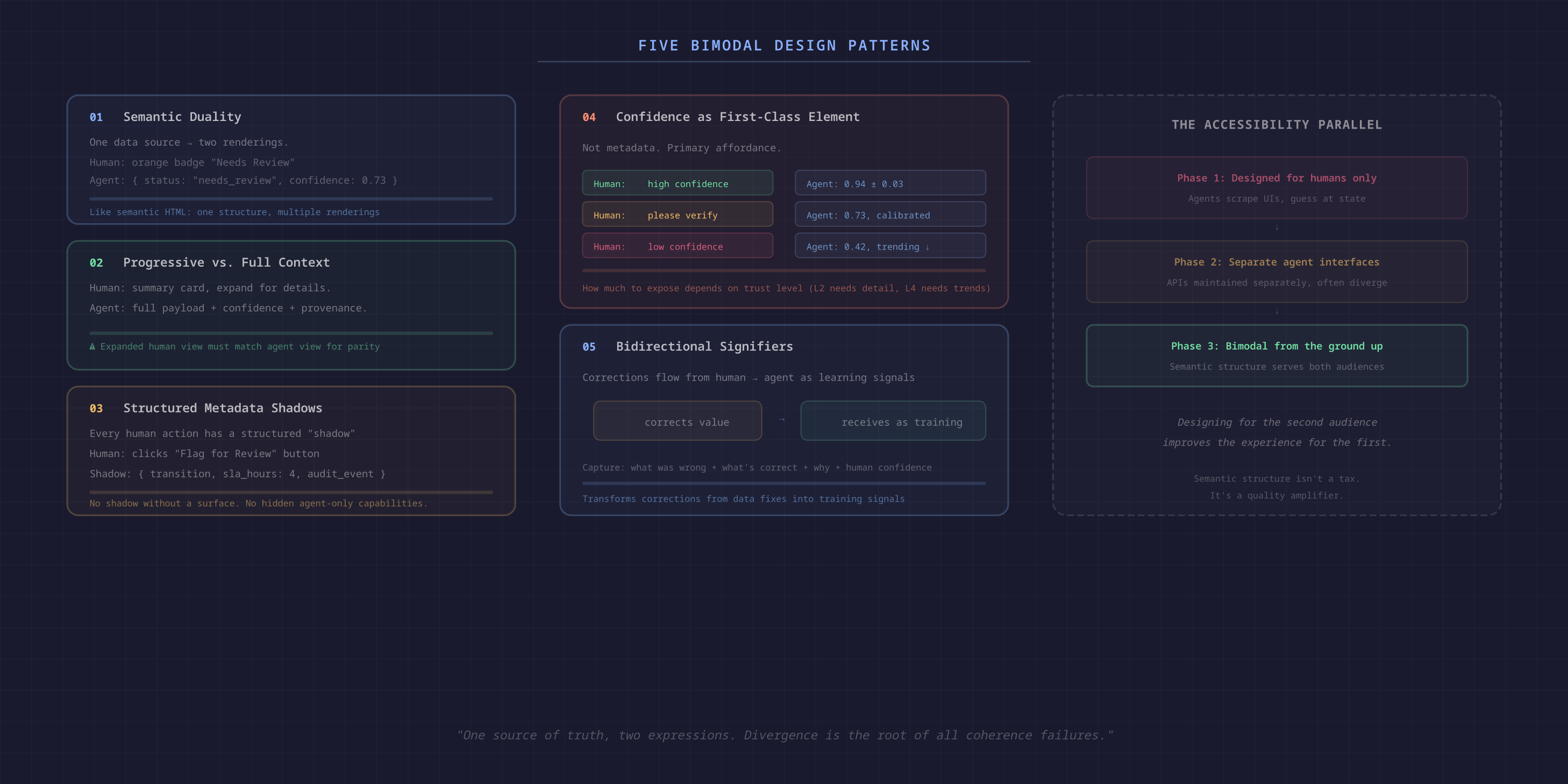
Pattern 1: Semantic Duality
{ status: "needs_review", confidence: 0.73, reason: "conflicting_dates" }). The human-facing layer renders this as an orange badge reading "Needs Review: conflicting dates found." The agent-facing layer reads the raw structure. Both are derived from the same data. Neither can diverge.<button> element has visual rendering (for humans) and semantic meaning (for screen readers and automation). Accessibility design solved a version of this problem decades ago. Bimodal design for agents is the next iteration.Pattern 2: Progressive Disclosure vs. Full Context
Pattern 3: Structured Metadata Shadows
{ action: "transition", from: "processing", to: "human_review", trigger: "manual_flag", requires_role: "reviewer", sla_hours: 4, audit_event: "manual_escalation" }Pattern 4: Confidence as a First-Class Design Element
Pattern 5: Bidirectional Signifiers
The Accessibility Parallel
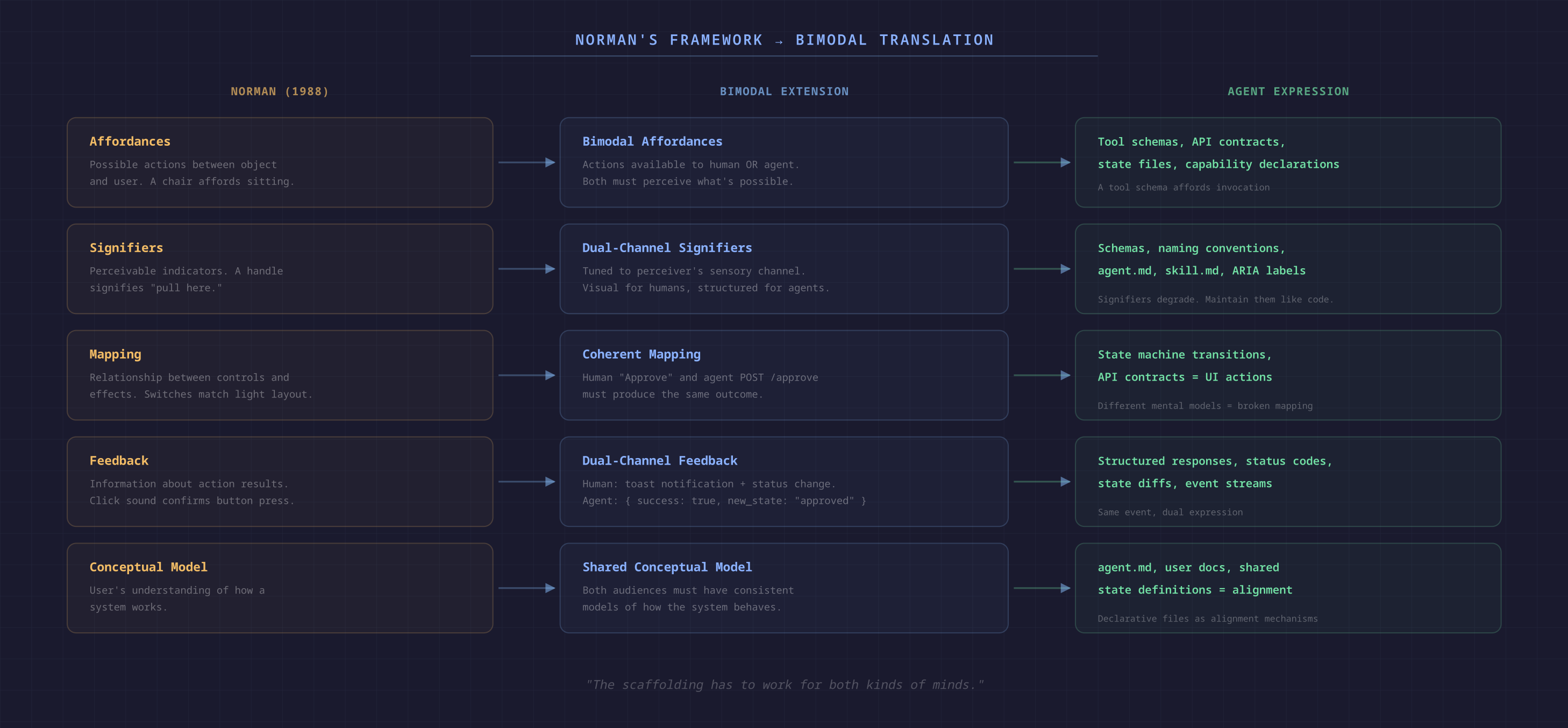
The Norman Mapping
Affordances
Signifiers
Mapping
POST /approve produce different outcomes, the mapping is broken.Feedback
{ success: true, new_state: "approved", next_step: "processing" }). Same event, dual expression.Conceptual Model
Where This Gets Hard
The Observation Problem
The Context Window as Perception Limit
The Legibility-Efficiency Tradeoff
Principles for Bimodal Design
Conclusion
References